Introduction
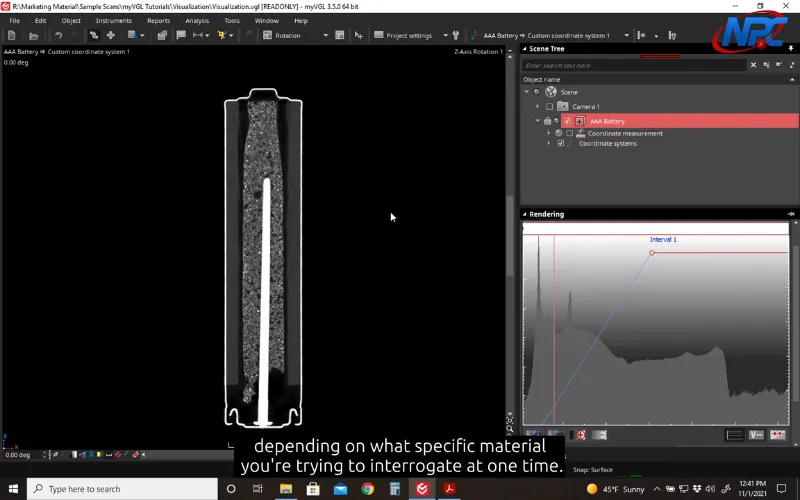
The Rendering Tool in the free MyVGL Viewer controls how CT data is visually displayed in the 3D view. While it does not modify the dataset itself, it plays a critical role in how clearly internal and external features can be seen.
This page explains what the Rendering Tool influences conceptually. The video demonstrates how to adjust these settings and observe their effect in real time.
What the Rendering Tool Controls
The Rendering Tool determines how voxel intensity values are visually interpreted.
It affects:
- Overall visibility
- Contrast between features
- How internal structures appear relative to outer surfaces
Small adjustments can significantly change how a dataset is perceived.
Rendering and Transparency
Transparency is one of the most influential rendering controls.
By adjusting transparency:
- External material can be visually reduced
- Internal features become easier to see
- Spatial relationships are easier to understand
The written explanation establishes the concept, but the video shows how transparency adjustments behave dynamically as the dataset is rotated and inspected.
Color and Intensity Adjustments
Color and intensity controls improve contrast and highlight density variation.
These adjustments help:
- Reduce visual noise
- Make subtle features stand out
- Improve clarity during reviews or presentations
Because these settings are relative to the dataset, the video is essential for understanding how small changes affect visibility.
Why Watch the Video
The Rendering Tool is best learned visually. The video shows:
- How rendering settings interact with one another
- How adjustments affect the dataset immediately
- How to refine views without over-adjusting
These interactions are difficult to capture fully in text alone.
Conclusion
The Rendering Tool in the MyVGL Viewer provides essential control over how CT data is displayed. Understanding its role helps users make better viewing decisions and extract more value from their datasets.
To see how these controls work in practice, watch the full tutorial video above.
Watch Full TutorialFor more MyVGL Viewer tutorials and CT visualization resources, visit:
https://www.nelpretech.com/myvgl-tutorials