Introduction
The first step in working with any CT dataset is opening it correctly. In the free MyVGL Viewer, the data-loading process prepares the scan for visualization without altering or processing the underlying voxel data.
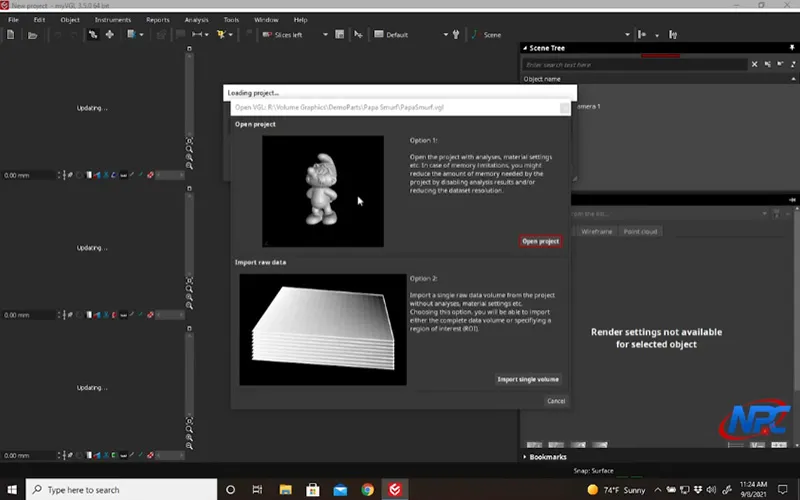
This page explains what happens when a dataset is opened and what users should expect during that process. The accompanying video demonstrates how to load data in the Viewer and navigate the initial setup visually.
What Happens When You Open a CT Dataset
When a CT dataset is opened in the MyVGL Viewer, the software loads voxel data and prepares it for interactive visualization.
This includes:
- Initializing the dataset structure
- Preparing rendering defaults
- Displaying an initial 3D view for orientation
The Viewer does not perform analysis or modify data during this step—it simply prepares the scan for viewing.
Why Proper Data Loading Matters
Opening data correctly ensures:
- The dataset displays as expected
- Rendering and interaction tools behave properly
- Users start with a stable, predictable view
Understanding this step helps prevent confusion later when adjusting renderers, color maps, or clipping tools.
What You’ll See When the Data Loads
Once loaded, the dataset typically appears in a default view designed to provide quick orientation.
At this stage, users may notice:
- An initial rendering mode applied automatically
- A dense or opaque appearance before adjustments
- The need to rotate or zoom to understand geometry
The video shows how to interpret this first view and what to do next.
Viewer Expectations vs. Full MyVGL
The free MyVGL Viewer is optimized for visualization and review. While it does not include advanced import options or preprocessing controls found in the full version of MyVGL, it provides everything needed to begin exploring and understanding CT data.
Why Watch the Video
Opening data is best learned visually. The video demonstrates:
- Where and how datasets are opened
- What the initial view looks like
- How to move from loading data to meaningful exploration
Conclusion
Opening CT data in the free MyVGL Viewer is the foundation for all subsequent exploration. Understanding what happens during this step helps users work more confidently with rendering, color, and clipping tools later on.
Watch the full tutorial video above to see the data-loading process in action and learn how to begin exploring your dataset effectively.
Watch Full TutorialFor additional MyVGL Viewer tutorials and CT visualization resources, visit:
https://www.nelpretech.com/myvgl-tutorials