How to Move, Rotate, and Explore CT Data
Getting oriented in a CT dataset is the first step to meaningful analysis.
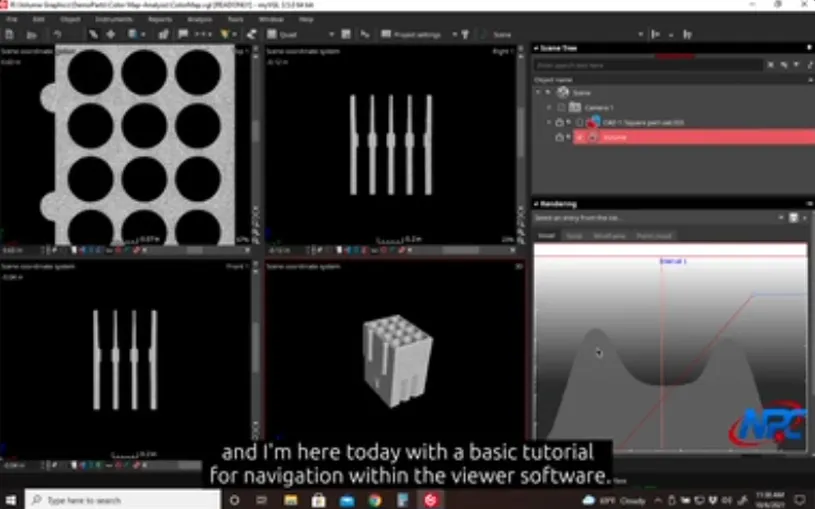
This tutorial introduces the core navigation controls in the free MyVGL Viewer, giving users a practical foundation for moving through 3D CT data with confidence.
Rather than overwhelming users with advanced tools, this video focuses on the essential camera and view controls needed to explore scanned parts efficiently—whether reviewing internal features, inspecting geometry, or preparing for deeper interrogation.
What This Tutorial Covers
In this video, you’ll learn how to:
- Rotate the dataset to view features from any angle
- Pan and zoom to focus on regions of interest
- Re-center and reset the view when orientation is lost
- Navigate smoothly without distorting the dataset
These navigation tools form the backbone of every MyVGL Viewer workflow and are used continuously across rendering, clipping, and color map analysis.
Why Navigation Matters in CT Visualization
CT datasets are inherently three-dimensional. Without proper navigation:
- Critical internal features can be missed
- Surface geometry may be misinterpreted
- Visual analysis becomes inefficient and frustrating
This tutorial demonstrates how controlled navigation allows users to maintain spatial awareness, making it easier to interpret complex internal structures without altering the underlying data.
Designed for the Free MyVGL Viewer
This tutorial is based entirely on the free version of MyVGL Viewer provided to customers for dataset review.
While the full MyVGL software includes advanced analysis and measurement tools, mastering navigation in the Viewer ensures users can:
- Confidently explore delivered CT data
- Communicate findings visually
- Prepare for deeper analysis if needed
Watch the Video to See Navigation in Action
Navigation is best learned visually. The video demonstrates:
- Mouse and control interactions in real time
- How subtle movements affect perspective
- Common mistakes and how to recover quickly
Related Tutorials:
Opening CT Data • Rendering Tools • Color Map Interpretation • Clipping Tools • Performance Optimization
Watch Full TutorialFor additional MyVGL Viewer tutorials and CT visualization resources, visit:
https://www.nelpretech.com/myvgl-tutorials