Introduction
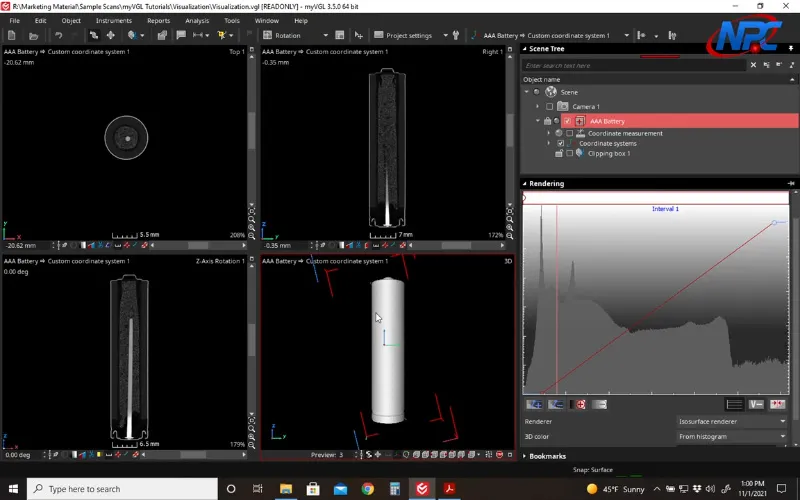
CT datasets contain far more information than what’s visible in a single view. In the free MyVGL Viewer, different renderers allow the same dataset to be visualized in multiple ways—each emphasizing different characteristics of the data.
This page explains the purpose of each renderer and when to use them. The accompanying video demonstrates how to switch renderers and observe their impact in real time.
Why Renderers Matter in CT Visualization
A renderer determines how voxel data is translated into a 3D visual representation. Changing the renderer does not change the dataset—it changes how information is emphasized.
Different renderers are useful for:
- Understanding internal density variation
- Clarifying external geometry
- Exploring complex internal structures
Switching renderers is often the fastest way to uncover features that are not immediately visible.
Volume Rendering: Seeing the Entire Dataset
Volume rendering displays the full voxel dataset, showing density variation throughout the part.
This view is commonly used to:
- Identify voids or inclusions
- Observe internal features without isolating surfaces
- Gain initial context when opening a dataset
The video demonstrates how volume rendering responds to transparency and interaction, which is difficult to convey through static text alone.
Iso Surface Rendering: Defining Geometry
Iso surface rendering extracts a surface based on a density threshold, simplifying the dataset into a clear geometric representation.
This renderer is useful for:
- Understanding part shape
- Identifying interfaces
- Orienting the dataset
The Viewer provides streamlined iso surface controls, and the video shows how small changes affect the resulting surface.
Why Watch the Video
While this page explains what each renderer does, the video shows:
- How to switch between renderers
- How each renderer reacts to transparency and rotation
- How quickly different views can change interpretation
Seeing these transitions live is key to understanding when each renderer is most effective.
Conclusion
Different renderers provide different perspectives on the same CT dataset. By switching between them in the MyVGL Viewer, users can gain a more complete understanding of both internal and external features.
Watch the video above to see how renderers behave in practice and how to choose the right view for your inspection goals.
Watch Full TutorialFor additional MyVGL Viewer tutorials, visit:
https://www.nelpretech.com/myvgl-tutorials